Introduction
Many businesses using ERP systems still face problems like ERPNext balance sheet mismatch, delayed financial reporting, and heavy Excel dependency during month-end closing. Manual reconciliation, disconnected accounting workflows, and inconsistent ledger management often create audit issues and reduce confidence in financial reports. Businesses now need a centralized ERP accounting system that improves reporting accuracy and supports better financial governance.
ERPNext v16 helps companies simplify financial reporting with features like custom financial statements, accounting dimensions, audit trails, and automated reconciliation workflows. With better ERPNext financial consolidation, role-based controls, and real-time financial dashboards, businesses can improve compliance reporting, reduce manual accounting work, and maintain audit-ready financial records across multiple branches and companies.
Why Manual Financial Reporting Systems Are No Longer Enough
Many businesses still struggle with traditional accounting systems because most financial reporting work is done manually in Excel sheets. This creates problems like delayed reports, duplicate entries, incorrect calculations, and difficulty tracking financial data across departments. Without proper ERP financial reporting and reliable financial reporting software, finance teams often work with outdated information.
Manual processes also make balance sheet automation difficult, which increases reporting mistakes during audits and month-end closing. A modern ERP accounting system helps businesses manage financial data more accurately from one centralized platform.
Traditional systems also make compliance and reporting flexibility difficult for growing businesses. Creating custom financial statements or department-wise reports usually takes extra time and manual effort.
Around 70%–75% of finance teams still rely on Excel for at least part of financial reporting, increasing the risk of errors and inconsistencies.
Now let’s understand the key features of custom financial reports in ERPNext v16.
Why ERPNext Balance Sheets Don’t Match During Audits
One of the most common finance issues businesses face in ERP implementations is balance sheet mismatch during audits or financial closing periods.
In many cases, the ERP system is not the actual problem. The issue usually comes from inconsistent accounting practices, incomplete reconciliations, or poor financial governance processes.
Common Reasons ERPNext Balance Sheets Fail Audit Validation
1. Incorrect Opening Balances: Migrating inaccurate historical balances from legacy systems can create long-term reporting inconsistencies and impact financial reporting accuracy.
2. Unclosed Fiscal Years: Failure to properly close accounting periods often results in duplicate adjustments, reporting conflicts, and weak financial controls.
3. Stock Ledger and GL Mismatch: Inventory valuation differences between stock modules and the general ledger can impact balance sheet accuracy, especially in manufacturing and trading businesses dealing with general ledger mismatch issues.
4. Duplicate Journal Entries: Manual accounting corrections outside standardized workflows increase audit compliance reporting risks and reconciliation problems.
5. Improper Chart of Accounts Structure: Poor account grouping and inconsistent ledger mapping affect financial statement accuracy and create difficulties in compliance reporting.
6. Missing Accounting Dimensions: Without proper accounting dimensions for cost centers, branches, or projects, businesses struggle to generate reliable and structured financial reports.
7. Spreadsheet-Based Consolidation: Manual Excel consolidations create version-control issues, increase audit exposure, and reduce real-time financial visibility across departments.
ERPNext v16 addresses these challenges through immutable ledger architecture, automated reconciliation workflows, audit trail tracking, role-based approvals, and structured financial reporting automation frameworks that improve compliance and reporting consistency.
What Are Custom Financial Report Templates in ERPNext v16?
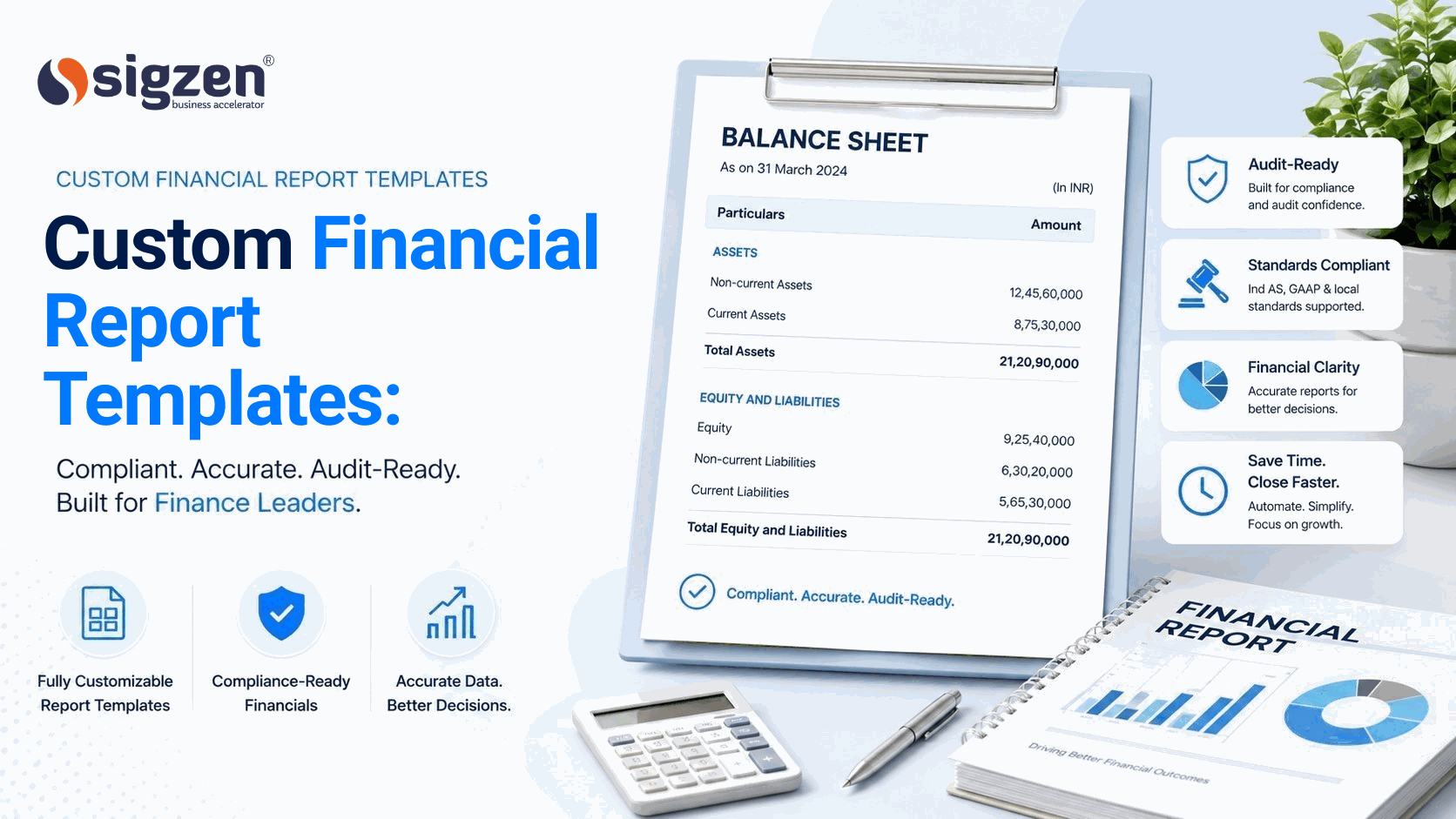
Custom Financial Report Templates in ERPNext v16 are flexible report formats that help businesses create financial statements based on their own structure and requirements.
These templates allow companies to customize balance sheets, profit and loss reports, and cash flow statements without depending on fixed formats. It helps improve accuracy and makes financial reporting easier to understand.
With ERPNext v16, businesses can design reports that match industry needs such as manufacturing, trading, or services. These templates reduce manual work and support better financial reporting automation, ensuring faster and more reliable data for decision-making. They also improve financial reporting accuracy and simplify audit preparation.
Key Features of ERPNext v16 Financial Reporting
Let's see Features of Erpnextv16 Custom finance Report
Immutable Ledger Architecture
ERPNext v16 uses an immutable ledger system that prevents unauthorized accounting modifications and improves transaction traceability. This helps businesses maintain better audit-ready financial reporting and improve overall financial reporting accuracy.
Custom Financial Statements
Businesses can create custom financial statements based on branches, departments, projects, and reporting requirements. This improves financial visibility, simplifies compliance reporting, and supports better management decisions.
Real-Time Financial Reporting
ERPNext v16 provides real-time financial reporting without depending on manual spreadsheets or delayed consolidations. Finance teams can monitor updated reports, improve month-end closing, and reduce reporting delays.
Accounting Dimensions
Using accounting dimensions, businesses can track profitability and expenses by cost center, branch, project, or business unit. This improves financial governance and makes financial consolidation more structured and accurate.
Automated Financial Consolidation
ERPNext v16 supports multi-company financial reporting and branch-wise consolidation from one centralized accounting system. This reduces manual reconciliation work and improves reporting consistency across locations.
Audit Trail and Role-Based Permissions
Built-in audit trail tracking and role-based access controls help businesses monitor approvals, accounting activities, and financial changes. This strengthens financial controls and improves audit compliance reporting.
Financial Compliance and GST Reporting
ERPNext v16 helps businesses manage GST reporting automation, statutory reporting, tax records, and compliance workflows from one platform. This improves financial compliance, reduces manual errors, and supports audit-ready ERP processes.
ERPNext v16 Balance Sheet Customization for Different Industries
Different industries have different financial reporting structures, and using the same balance sheet format for every business often creates reporting difficulties. ERPNext v16 helps businesses customize balance sheets based on their operations, reporting requirements, and financial processes.
- Manufacturing Industry
- Chemical and Pharmaceutical Industry
- Real Estate Industry
- Retail and Distribution Industry
- Service-Based Businesses
ERPNext v16 helps different industries customize balance sheets based on their business and reporting requirements. This improves financial visibility, reporting accuracy, and reduces manual accounting work.
ERPNext vs Excel for Financial Reporting Automation
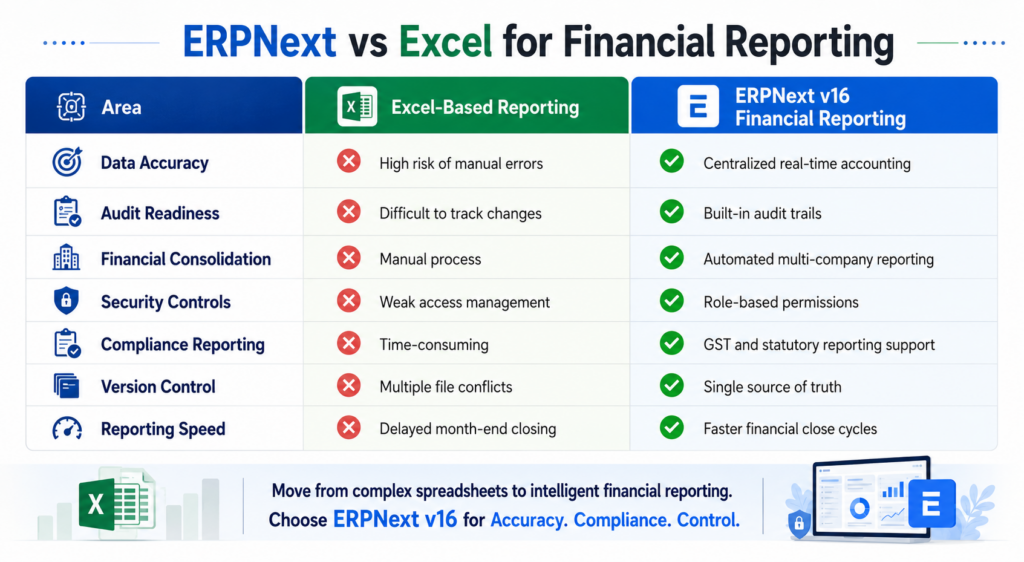
Many businesses still depend on Excel for financial reporting, reconciliation, and month-end closing, but manual spreadsheets often create reporting delays, version-control issues, and higher risk of accounting errors. ERPNext v16 improves financial reporting automation by centralizing accounting data, automating reconciliations, and providing real-time financial reporting from a single platform.
Unlike spreadsheet-based reporting, ERPNext supports audit-ready financial reporting, multi-company consolidation, role-based access controls, and structured financial compliance workflows. This helps businesses reduce manual work, improve reporting accuracy, and maintain better financial visibility across departments and branches.
How ERPNext v16 Improves Financial Compliance and Audit Readiness
Managing financial compliance and preparing audits becomes difficult when businesses depend on manual accounting processes and scattered financial records.
Now let’s understand the keyways ERPNext v16 improves financial compliance and audit readiness for businesses.
Centralized Financial Records
ERPNext v16 stores all accounting transactions, invoices, payments, and ledger entries in one system. This helps finance teams access financial records easily and reduces confusion during audits.
Accurate Financial Reporting
Using ERP financial reporting, businesses can generate accurate reports with updated financial data. This reduces reporting mistakes and improves confidence during compliance checks.
Automated Compliance Reporting
A reliable financial compliance ERP system helps businesses manage GST reports, tax records, and statutory reporting more efficiently. This reduces manual work and lowers compliance risks.
Reduced Manual Errors
Manual calculations and spreadsheet dependency often create accounting mistakes and reporting inconsistencies. With accounting automation, businesses can improve financial accuracy and reduce duplicate entries.
Role-Based Access Control
ERPNext v16 allows businesses to control access based on employee roles and responsibilities. This improves financial security and prevents unauthorized access to sensitive accounting data.
Multi-Branch Financial Visibility
Businesses with multiple locations can manage financial data from one centralized platform using cloud ERP accounting. This improves reporting consistency across branches and departments.
Real-Time Financial Monitoring
Finance teams can monitor expenses, liabilities, receivables, and cash flow using updated financial dashboards. This helps businesses maintain better financial control and compliance tracking.
Flexible Compliance Reporting
ERPNext v16 allows companies to create custom financial statements and compliance reports based on industry and business requirements. This makes reporting more practical and easier to manage.
Now let’s understand the step-by-step process to implement custom financial report templates in ERPNext v16.
How to Implement Custom Financial Report Templates in ERPNext v16
Setting up custom financial report templates in ERPNext v16 requires proper planning, financial governance, and structured reporting workflows.
Let’s understand the step-by-step process to implement custom financial reporting in ERPNext v16.
1: Analyze Financial Reporting Requirements
- Identify required custom financial statements
- Review audit and compliance reporting needs
- Understand management reporting expectations
2: Review Existing ERP Accounting Structure
- Analyze current ERP accounting system workflows
- Check chart of accounts and ledger structures
- Identify reporting gaps and manual processes
3: Configure ERPNext Financial Modules
- Set up company accounting details
- Configure tax rules and financial settings
- Enable cloud ERP accounting features
4: Create Custom ERP Reports
- Design branch-wise financial reports
- Configure department-wise reporting formats
- Build project-wise custom ERP reports
5: Set Financial Report Filters
- Add date and fiscal year filters
- Configure branch and cost center filters
- Enable flexible ERP financial reporting options
6: Enable Accounting Automation
- Automate recurring financial reports
- Configure approval workflows and notifications
- Improve processes using accounting automation
7: Integrate Business Departments
- Connect sales and purchase modules
- Integrate inventory with finance operations
- Centralize data using ERP finance automation
8: Configure Compliance Reporting
- Set up GST and statutory reports
- Maintain accurate audit records
- Improve reporting using financial compliance ERP
9: Test Financial Report Accuracy
- Verify balance sheet calculations
- Check ledger and journal entries
- Validate balance sheet automation reports
10: Manage User Access and Security
- Configure role-based permissions
- Restrict access to financial reports
- Improve security with an audit-ready ERP system
11: Train Finance Teams
- Train users on report generation
- Educate teams on financial workflows
- Improve adoption of financial reporting software
12: Monitor and Improve Reports Regularly
- Review financial reporting performance
- Update reports based on business needs
- Track insights using finance analytics ERP tools
Why Businesses Choose ERPNext v16 for Financial Reporting Automation
- Businesses choose ERPNext v16 because it improves ERP financial reporting with faster and more accurate report generation.
- A centralized ERP accounting system helps companies manage accounting data from multiple departments in one platform.
- Accounting automation reduces manual financial work and helps finance teams save reporting time.
- Companies use custom financial statements to create reports based on their business and compliance requirements.
- With cloud ERP accounting, businesses can securely access financial reports from different branches and locations.
- Features like audit-ready ERP and financial compliance ERP help businesses maintain accurate records and simplify audits.
Business Outcomes of ERPNext Financial Automation
Businesses implementing ERPNext financial reporting automation often achieve measurable operational improvements, including:
- Faster month-end closing cycles
- Reduced spreadsheet dependency
- Improved audit preparedness
- Better financial visibility across branches
- Lower manual reconciliation effort
- Faster board and management reporting
- Improved compliance reporting accuracy
For example, manufacturing and multi-location businesses often reduce financial consolidation effort significantly after implementing centralized ERPNext reporting workflows.
Why Choose Sigzen Technologies for ERPNext Financial Reporting Solutions
Businesses looking to improve ERP financial reporting, accounting automation, and custom financial statements need a reliable ERP implementation partner. Sigzen Technologies Pvt. Ltd. helps companies simplify financial reporting, improve compliance management, and maintain better financial visibility through customized ERPNext solutions.
With expertise in cloud ERP accounting and ERPNext customization, businesses can manage accounting operations more accurately and efficiently.
Looking to improve your financial reporting process with ERPNext v16? Connect with Sigzen Technology for customized ERPNext financial reporting solutions for your business.
Conclusion
ERPNext v16 removes the daily frustration of manual balance sheets, Excel dependency, and non-compliant financial reports. With balance sheet automation, custom financial report templates, and a centralized ERP accounting system, finance teams can close months faster and walk into audits with confidence. Businesses across manufacturing, retail, and services are already using ERP financial reporting to cut down errors and save reporting time.
Frequently Asked Questions
1. What are custom financial report templates in ERPNext v16?
Custom financial report templates in ERPNext v16 help businesses create custom financial statements based on their accounting structure, departments, branches, and reporting requirements.
2. How does ERPNext improve financial reporting accuracy?
ERP financial reporting in ERPNext v16 reduces manual calculations and reporting errors by centralizing accounting data and automating financial workflows.
3. Can ERPNext support multi-branch financial reporting?
Yes, cloud ERP accounting in ERPNext v16 allows businesses to manage branch-wise financial reports, centralized accounting, and multi-location financial operations.
4. How does ERPNext help with audit and compliance management?
ERPNext works as an audit-ready ERP system by maintaining organized financial records, audit trails, and compliance reports for easier audit preparation.
5. Why do businesses use ERPNext for accounting automation?
Businesses use ERPNext because accounting automation helps reduce manual financial work, improve reporting speed, and simplify daily accounting operations.
Reader rating
How useful was this article? Tap a star to rate.