Seamless Odoo to ERPNext Migration

Transform Your ERP Without Disruption
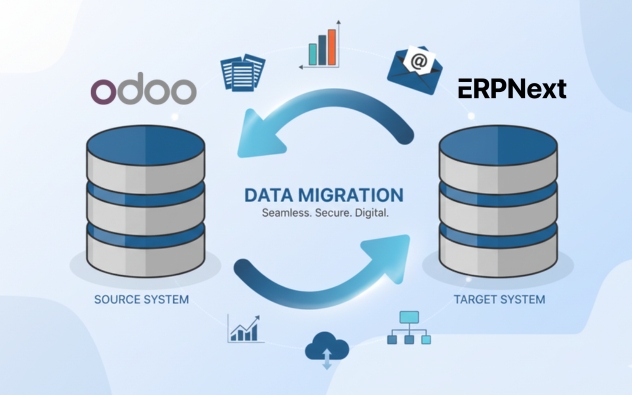
Make the strategic shift from Odoo to ERPNext and unlock true open-source freedom with reduced costs, enhanced customization, and comprehensive functionality. At Sigzen Technologies, we specialize in secure, zero-downtime Odoo to ERPNext migrations that preserve complete data integrity while delivering a modern, scalable ERP platform tailored to your business needs. Experience the benefits of ERPNext’s simplified user interface, lower total cost of ownership, and enterprise-grade features without vendor lock-in.​

Odoo to ERPNext Migration Services

Why Choose Sigzen Technologies for Odoo to ERPNext Migration Services?

Comprehensive Migration Strategy

Every successful Odoo to ERPNext migration begins with a strategic plan. Our migration services include an in-depth assessment of your Odoo configuration, custom modules, and data architecture. By understanding your specific Odoo setup including apps, workflows, and integrations, we design a migration strategy that ensures accurate data mapping, minimizes disruptions, and delivers a seamless transition to ERPNext’s unified platform.​

Data Integrity and Security

Data accuracy and security are paramount when migrating from Odoo’s multi-app structure. Our migration specialists use industry-leading practices including comprehensive data mapping, rigorous validation protocols, and extensive reconciliation checks to ensure complete data integrity throughout the migration process. We implement stringent security measures protecting sensitive information during extraction, transformation, and loading phases, giving you confidence that your business-critical data transfers safely and accurately.​

Customized ERPNext Setup

Migrating from Odoo to ERPNext is more than data transfer; it’s an opportunity to consolidate fragmented apps into ERPNext’s integrated platform. Our team rebuilds Odoo customizations using Frappe’s flexible framework, configures ERPNext modules matching your business processes, and implements workflows that replicate or enhance your Odoo operations. We ensure ERPNext becomes a powerful unified asset tailored to your specific needs, eliminating the data silos inherent in Odoo’s separate applications.​

Integration with Existing Systems

If your business relies on additional applications beyond Odoo, we integrate ERPNext seamlessly during migration. Our Integration Specialists connect ERPNext with your CRM, e-commerce platforms, payment gateways, and third-party tools using REST APIs and webhooks, ensuring smooth data flow across your technology ecosystem. This provides a unified environment that enhances efficiency, maintains data consistency, and improves collaboration across departments.​

Minimal Downtime and Business Disruption

We understand that downtime impacts productivity and revenue. Our Odoo to ERPNext Migration Services minimize disruptions through phased migration approaches and parallel run strategies where both systems operate simultaneously during transition. We schedule migrations during low-activity periods, conduct rigorous testing at each stage, and provide comprehensive go-live support ensuring smooth transition without hindering daily operations.​

User Training and Post-Migration Support

A successful migration includes empowering your team to leverage ERPNext’s unified platform effectively. Our services include tailored training sessions addressing the shift from Odoo’s multiple apps to ERPNext’s integrated modules, ensuring employees confidently navigate the new system. We offer comprehensive post-migration support, system optimization, and ongoing assistance as your team adapts to ERPNext’s superior capabilities quickly and effectively.

Step-by-Step Process to Migrating from Odoo to ERPNext

Discovery and Current System Assessment

Conduct comprehensive evaluation of your existing Odoo environment including all installed applications, custom modules, database structure, and workflow configurations. Document current business processes, identify pain points with Odoo’s fragmented app architecture, and define clear objectives for ERPNext migration aligned with business goals.​

Data Inventory and Quality Analysis

Perform thorough data audit across all Odoo apps identifying data quality issues, duplicates, incomplete records, and inconsistencies accumulated across separate Odoo applications. Catalog all master data, transactional records, and historical information requiring migration ensuring comprehensive data understanding.​

Migration Blueprint Development

Create detailed migration strategy outlining phased approach, timelines, resource allocation, and risk mitigation procedures. Develop comprehensive data mapping documents showing relationships between Odoo apps and ERPNext’s unified modules, define validation criteria, and establish rollback procedures.​

ERPNext Environment Setup and Customization

Configure ERPNext instances matching your business requirements, recreate Odoo customizations using Frappe framework, and develop custom apps for specialized functionality. Establish user roles, permissions, and workflows replicating proven Odoo processes while leveraging ERPNext’s integrated architecture.​

Data Cleansing and Preparation

Execute comprehensive data cleansing protocols removing duplicates, standardizing formats, correcting inconsistencies, and validating relationships. Prepare clean datasets for migration ensuring only accurate, relevant information transfers to ERPNext’s unified database structure.​

Phased Data Migration Execution

Extract data from Odoo’s PostgreSQL database systematically by module, transform to ERPNext-compatible formats, and load into test environment. Conduct incremental migrations starting with master data followed by transactional records, validating accuracy after each phase before proceeding.​

Integration Implementation and Testing

Develop integrations connecting ERPNext with existing business applications, third-party tools, and services previously connected to Odoo. Implement REST APIs and webhooks ensuring seamless data flow, then conduct comprehensive integration testing validating all data exchange points.​

User Acceptance Testing and Validation

Facilitate thorough user acceptance testing where department teams validate migrated data, test workflows, and verify ERPNext functionality against business requirements. Create test scenarios for each module, document issues, and resolve discrepancies ensuring system readiness.​

Training, Go-Live, and Post-Migration Support

Deliver comprehensive training addressing transition from Odoo’s multi-app structure to ERPNext’s unified platform. Execute carefully planned go-live during low-activity period with dedicated support team monitoring system performance, resolving issues immediately, and providing ongoing optimization assistance.​

Get a free no obligation quote now

Ready to unlock the full potential of ERPNext for your business? Contact us today for a no-obligation consultation to learn more about our ERPNext Consulting Services and discover how our expert ERPNext consultants can help you optimize your operations and drive growth with a customized, scalable ERP solution.

A Quick Comparison of Odoo and ERPNext


Feature
Odoo
ERPNext
Cost Free Community Edition with limited features; Enterprise requires paid licenses per user Entirely free and open-source with no licensing fees
Customization Odoo Studio available (Enterprise only); vendor-controlled modifications Extensive customization through Frappe framework with minimal coding required
Community Active community but fragmented between Community and Enterprise versions Large, unified open-source community with extensive support resources
Feature Set Modular apps approach – requires separate apps for different functions Comprehensive integrated suite including CRM, accounting, inventory, manufacturing, projects, HR, and helpdesk
Manufacturing Basic BOM and operations Advanced manufacturing with work centers, quality checks, production planning, and MRP
Focus Modern UI/UX with paid enterprise features Complete ERP functionality with full control and transparency
Deployment SaaS-focused with self-hosting complexity Flexible deployment – cloud, on-premise, or hybrid
Support & Helpdesk Not available in Community Edition Native multi-channel support with SLAs included
Sigzen Technologies global ERP expertise for tailored business solutions

Conclusion

Migrating from Odoo to ERPNext consolidates fragmented applications into a unified platform, eliminating data silos and reducing subscription costs significantly. Sigzen Technologies ensures seamless transition with comprehensive migration services that preserve functionality while delivering superior integration and flexibility. ERPNext’s open-source architecture eliminates per-user licensing fees, offering enterprise-grade capabilities with greater customization potential through Frappe framework. Our proven methodology guarantees data integrity, minimizes disruption, and positions your organization for scalable growth with reduced total cost of ownership and enhanced operational efficiency.​

Frequently Asked Questions

Why should I migrate from Odoo to ERPNext?

Migrating from Odoo to ERPNext cuts your annual software costs by 30-50% by removing per-user licensing fees entirely. Every module Accounting, CRM, HR, Manufacturing, and Inventory is included by default, with no tiers or hidden charges. The open-source Frappe framework also makes customization easier and ends vendor lock-in, giving you full control over your ERP as your business grows.

How long does Odoo to ERPNext migration take?

Odoo to ERPNext migration usually takes 2 to 4 months, based on your size. Small businesses under 50 users finish in about 2 months; mid-sized teams of 50-200 users take around 3 months, and enterprises with 200+ users need roughly 4 months. Sigzen deploys modules in phases and schedules data transfers during off-peak hours to keep disruption minimal.

Will I lose data during migration from Odoo to ERPNext?

No, Sigzen guarantees zero data loss. All customer records, invoices, inventory, transactions, and opening balances are fully migrated and validated through automated record-count checks, transaction reconciliation, and integrity testing against your source Odoo data. ERPNext runs parallel to Odoo until you confirm the data is accurate, and sample data testing catches any issues before the full migration runs.

Can my custom Odoo modules be migrated to ERPNext?

Yes, Sigzen rebuilds your custom Odoo functionality in ERPNext using the Frappe framework. Custom Odoo apps can’t transfer directly, but our certified developers analyze each module and recreate it through custom apps, fields, scripts, and integrations often improving the original. Frappe offers more flexible customization than Odoo, which makes your workflows easier to maintain over the long term.

How much does Odoo to ERPNext migration cost?

Odoo to ERPNext migration cost depends on your data volume, number of modules, customizations, and integration needs. Sigzen provides a transparent fixed quote after assessing your Odoo setup. Because ERPNext is fully open-source with no per-user or licensing fees, most businesses cut total ERP costs by 30-50% annually, recovering the migration investment quickly.

Will my business operations be disrupted during migration?

No, most Sigzen clients experience zero downtime. We run ERPNext alongside your Odoo system and schedule data transfers during off-peak hours or weekends, so daily work continues uninterrupted. Modules are deployed in phases to let your team adapt gradually, and a dedicated support team stays available during go-live to resolve any issues right away.

What support does Sigzen provide after Odoo to ERPNext migration?

Sigzen provides 6 months of post-migration support, including system optimization, performance monitoring, and dedicated troubleshooting. You also get one week of intensive user training, so your team adopts ERPNext confidently. During this period, our consultants handle customizations, integrations, and enhancements as you grow. After six months, flexible hourly support continues, so your system keeps evolving with your business.

What happens to my Odoo integrations during migration?

Sigzen rebuilds your Odoo integrations in ERPNext using the Frappe framework’s API capabilities. We review each connection payment gateways, e-commerce platforms, shipping providers, and other tools and recreate them through native integrations, REST APIs, webhooks, or middleware. Our certified developers maintain seamless connectivity throughout the move, often delivering more efficient integrations with lower maintenance overhead than Odoo.

Do you provide a demo or proof of concept before full migration?

Yes, Sigzen provides a demo and proof of concept before any full migration. We configure a demonstration environment with sample data reflecting your actual processes, so you can test key workflows and confirm ERPNext fits your needs hands-on. This phase also identifies customization, integration, and training priorities upfront, helping you make a confident, informed decision before committing.

What if we need changes after going live?

Any changes you need within the 6-month post-migration support period are included at no extra cost. Our team handles system refinements, workflow tweaks, and adjustments based on user feedback to keep ERPNext aligned with how you work. After six months, ongoing changes are available through flexible hourly support, so your system can keep adapting as your business evolves. 

You might also be interested in

For more information, visit:

Excel or Spreadsheet to ERPNext Migration
Custom or Legacy ERP to ERPNext Migration
Oracle NetSuite to ERPNext Migration
QuickBooks to ERPNext Migration Services
Rating: 5 / 5 (20 votes)
Close Menu